BeNews LogoBeNews
HomeHome ForumsForums ArticlesArticles LinksLinks Media CenterMedia Center StoreStore ContactContact
BeOS Free Download
BeOS In Focus

The BeBox Circa 2001

Want to build the ultimate BeOS Dream Machine?

Posted by Oliver Thylmann - Wednesday, March 14th at 12:39pm
 

Part 6: Conclusion


Below you will find two tables. The first one is an "enthusiast" machine with certain components that are not officially supported quite yet. Those willing to take a calculated risk of running into certain compatibility issues in exchange for extra performance are welcome to build a machine similar to the one listed in this table.

[Gobe Software] [BeOS Pro 5.0] [Productive 2.0]

The second configuration only includes the things that are certified to work right out of the box. While you might be getting some older parts, you shouldn't have any problems getting any of the to work with BeOS. Also please note that although this machine appears to be slightly cheaper, it does not include a CD burner.

Anyway, here are the final lists of all the various pieces of the BeBox puzzle:
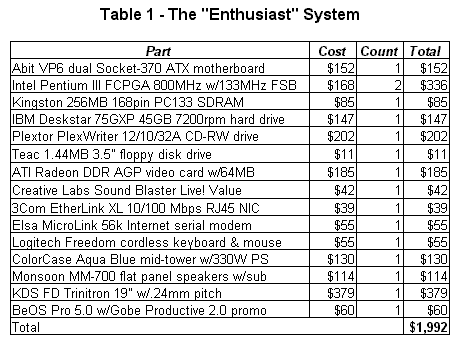

(Disclaimer: Some of the parts in the above system are not officially supported by Be or Gobe. If you are not sure what you are doing and want to have the option to call Gobe's customer support, then don't use this system. Just making sure you know :))
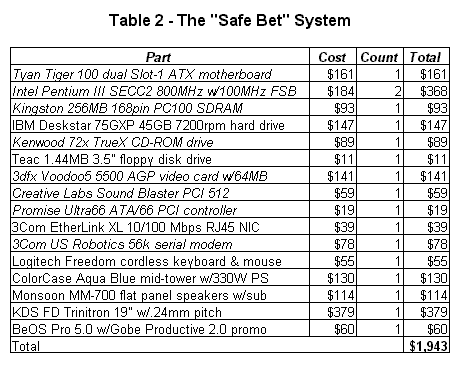
As you can see above, we went to great lengths to make sure that we kept our spending just under the self-imposed $2,000 budget cap. However, you must realize that neither shipping nor taxes are included. Also, we even had to forgo a few "extras" such as a video capture card, which is considered a necessity by some. However, we encourage you to support Be and get a full legal copy of BeOS Pro, complete with Gobe Productive. In fact, right now you can buy this awesome bundle for a promotional price of $60. We're absolutely positive that you won't regret it.

Anyway, whether you choose to follow our advice or decide to take a different route, we wish you the best of luck building your very own kick-a** BeOS-compatible machine. Let the sprit of the BeBox live on!

Page Index
1: Introduction
2: Part 1: Heart and Soul
3: Part 2: Audio and Video
4: Part 3: Drives and Stuff
5: Part 4: Various Exterior Pieces
6: Part 5: Networking Options
7: Part 6: Conclusion


[ Discuss this article ]
      (102 comments)


Other stories with topic 'Hardware' Email Story
BeBox Owners Have Forum at BeBox Zone
 
Newer Version of Unified NVidia Driver Available
 
GeForce3 2D Driver By This Weekend
 
BeOS Hardware Compatibility Site Goes Live
 

To:
From:

Copyright © 1998-2001 by BeNews.
BeNews and the BeNews logo are trademarks of BeNews.
Reproduction of stories by BeNews Corp. is granted only if credit is given to benews.com.
The My Netscape icon and associated icons are property of the Netscape Communications Corporation. Some of the icons used herein are the property of Be, Inc. and are used by permission. All other trademarks, icons, and logos, shown or mentioned, are the property of their respective owners.


Powered by Geektek Hardware
Submit Story

Write an Article
BeOS Box Icon
BeOS Radio
Listen to BeOS RadioMP3 Audio Stream

Software Updates
By BeBits
QS Editor 0.7
MOTDbot 1.0.2
BeDictionary 0.5
Wolle 2.0
BeTVOut V0.10.2
BeBochs 1.2.1
Palm Reflections 1.0.0 Beta 3
LocaleTracker Languages 1.2
PDFlib 4.0.1
libMgTk 2.0.0
ucon64 1.9.6
OpenTracker.fr 5.2b289 vf
Colors! 1.5.1
libFuzzy++.so 3.0 final
Scumm Viewer beta 2

Software of the Week
By Eugenia Loli-Queru
BeWare Colors!
Colors! is a color picker like that in Adobe Photoshop.You can easily choose a color and then drag it to the place where you need it as HTML hex code. You can collect up to 10 favorite colors which are restored the next time you start Colors!. And last but not least, there is also a color preview for text.
Post Comment

Tip of the Day
From the BeOS Tip Server
Install the Japanese Input Method


BeNews Button
About Linking to BeNews

BeNews Privacy Statement